Embroidery Stitches Procreate Brushes: Bringing Textile Texture to Digital Art
Digital illustration has come a long way from flat, vector-like lines. Today’s audiences crave texture, depth, and the tactile warmth of traditional media. This is where Embroidery Stitches Procreate Brushes bridge the gap between the digital canvas and the physical world of thread and fabric. For artists working on an iPad, these tools offer a shortcut to achieving realistic embroidery effects without the hours of manual rendering or the need for actual needlework skills.
The appeal of digital embroidery isn’t just aesthetic; it is functional. Whether you are designing a logo for a boutique clothing brand, creating social media graphics that stand out in a crowded feed, or illustrating a children’s book with a cozy, handmade feel, having access to authentic stitch patterns changes the workflow entirely. Instead of painting every individual thread, you can focus on composition and color, letting the brushes handle the intricate textural details.
Why Digital Embroidery Matters for Modern Creators
In a visual landscape dominated by sleek, minimalist design, organic textures provide a necessary contrast. Embroidery Stitches Procreate Brushes allow creators to inject personality and warmth into their work. This is particularly valuable for entrepreneurs and small business owners who want their branding to feel approachable and artisanal rather than corporate and cold.
Consider the rise of "cottagecore" and slow-living aesthetics on platforms like Instagram and Pinterest. Users are drawn to content that feels handcrafted. By using realistic embroidery stitches, a digital artist can mimic the look of a patch on a denim jacket or a stitched monogram on a linen napkin. This creates an immediate emotional connection with the viewer, suggesting care, tradition, and quality.
For freelancers and graphic designers, time is money. Manually drawing hundreds of tiny stitches to simulate embroidery is impractical for client deadlines. These brushes automate the repetitive aspects of texture creation. With 40 different stitch effects available, you can switch from a thick, chunky satin stitch to a delicate running stitch in seconds. This versatility means you can adapt your style to fit various client needs without learning new software or techniques.
Real-World Applications Across Industries
The utility of these brushes extends far beyond simple hobbyist doodling. Here is how different users can integrate them into their professional and personal projects:
- Fashion and Apparel Design: Before sending a design to a manufacturer, fashion illustrators can use these brushes to visualize how embroidery will look on a garment. You can test placement, density, and color combinations digitally, saving costly sampling errors.
- Print-on-Demand Businesses: Sellers on platforms like Etsy or Redbubble often create designs for t-shirts, tote bags, and hats. Using realistic embroidery stitches in your digital mockups makes the product listing more appealing. Customers are more likely to buy when they can clearly imagine the texture of the final product.
- Social Media Content Creation: Bloggers and influencers can create eye-catching story highlights, post borders, or decorative elements that look like stitched patches. This adds a unique visual signature to their feed, helping them stand out from competitors using standard stock assets.
- Children’s Book Illustration: Authors and illustrators aiming for a soft, comforting vibe can use these brushes to add texture to characters’ clothing or background elements. The tactile quality of embroidery evokes nostalgia and safety, which aligns perfectly with children’s literature.
- Wedding and Event Stationery: Designers creating invitations can simulate embroidered monograms or floral motifs. This gives clients a preview of a luxury, high-end look without the expense of actual thread work during the design phase.
Understanding the Toolset: What You Get
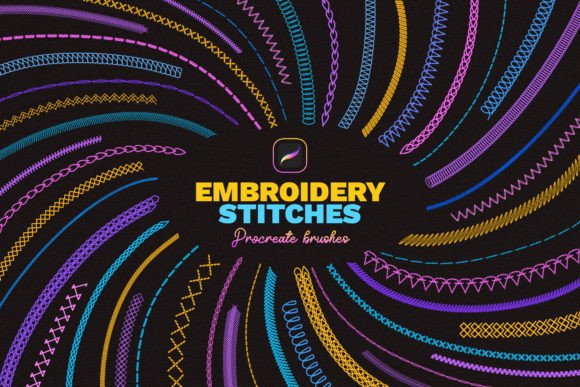
This specific set includes 40 Procreate brushes, each designed to mimic a different aspect of traditional needlework. The variety is crucial because embroidery is not a single technique; it is a collection of methods. You have satin stitches for filling shapes, backstitches for outlines, French knots for detailed accents, and chain stitches for decorative borders.
The key feature here is realism. These are not just patterned stamps; they respond to pressure and tilt, much like real Procreate brushes do. This allows for natural variation in line weight and texture, preventing the artwork from looking robotic or repetitive. The inclusion of a video tutorial ensures that even beginners can understand how to layer these brushes effectively to build up complex, multi-dimensional designs.
It is important to note that these brushes are compatible ONLY with the Procreate application for Apple iPad. They will not work with Adobe Photoshop, Procreate Pocket, or any other graphic editing software. This specificity is a benefit for iPad users, as the brushes are optimized for the Apple Pencil’s capabilities, ensuring smooth performance and accurate stroke recognition.
How to Integrate These Brushes into Your Workflow
Getting started is straightforward, but maximizing their potential requires a bit of experimentation. Here is a practical approach to using Embroidery Stitches Procreate Brushes:
- Installation: Download the file directly to your iPad. Tap on the
Stitches_by_Sko4.brushsetfile. Procreate will automatically install all the brushes, and they will appear at the top of your brush list. This seamless integration means you can start creating immediately. - Layering for Depth: Real embroidery has height. To mimic this, use multiple layers. Start with a base color, then add a slightly lighter shade for highlights and a darker shade for shadows. Use the stitch brushes on separate layers so you can adjust opacity and blend modes independently.
- Combining Stitches: Don’t rely on just one brush type. Use a running stitch for delicate outlines and a satin stitch for bold fills. Mixing techniques creates visual interest and authenticity.
- Color Selection: Embroidery thread has a sheen. Choose colors that reflect light realistically. Often, using a slightly desaturated color for the shadow and a vibrant, high-saturation color for the highlight works best.
Considerations Before You Buy
While these tools are powerful, they are not a magic button for perfect art. Users should consider their current skill level and hardware. Since these are exclusive to Procreate on iPad, you must own an Apple iPad and the Procreate app. If you work primarily on desktop software like Illustrator or Photoshop, these brushes will not serve you.
Additionally, while the brushes simplify the process, understanding basic principles of light and shadow is still essential. The brushes provide the texture, but you must provide the form. Watching the included video tutorial is highly recommended to grasp how the creator intends for the brushes to be layered and manipulated.
For those new to digital art, there may be a learning curve in understanding how to control the Apple Pencil pressure to get the desired stitch density. However, the easy to draw nature of these brushes means that even with minimal practice, you can achieve respectable results. The key is patience and iteration.
Final Thoughts on Digital Texture
Incorporating Embroidery Stitches Procreate Brushes into your toolkit is an investment in versatility. It allows you to pivot between styles quickly, offering clients and audiences a richer, more textured visual experience. Whether you are designing a logo, illustrating a story, or creating content for social media, the ability to simulate the warmth of hand-stitched thread adds a layer of sophistication and charm that flat digital art often lacks.
By leveraging these 40 different stitch effects, you save time while enhancing the quality of your output. The result is artwork that feels tangible and inviting, bridging the divide between the digital screen and the physical world. For any iPad artist looking to expand their textural repertoire, this brush set offers a practical, efficient, and creatively liberating solution.