Mastering Digital Aquarelle: A Practical Guide to Watercolor Procreate Brushes
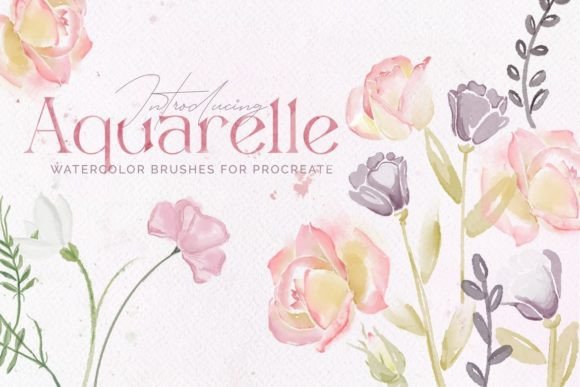
The transition from traditional media to digital illustration often presents a significant hurdle for artists who cherish the organic unpredictability of watercolors. While digital tools offer undo buttons and infinite layers, they frequently lack the tactile satisfaction and textural depth of paper and pigment. This is where specialized toolsets like the Aquarelle Watercolor Procreate Brushes become essential. Designed specifically for the iPad ecosystem, this collection aims to bridge the gap between analog authenticity and digital convenience, offering a suite of sixteen realistic texture brushes alongside five high-resolution paper textures.
For illustrators, letterers, and designers evaluating their digital toolkit, understanding the specific capabilities and limitations of such brush sets is crucial. This analysis explores how these brushes function, where they excel compared to standard digital options, and how to determine if they align with your creative workflow.
Understanding the Aquarelle Aesthetic in a Digital Space
Watercolor is defined by its transparency, fluidity, and the way pigments interact with the tooth of the paper. Replicating this digitally requires more than just a soft-edged brush; it demands complex algorithms that simulate wet-on-wet diffusion, granulation, and edge hardening. The Aquarelle Watercolor Procreate Brushes are engineered to mimic these physical properties. Unlike generic round brushes that simply lower opacity, these tools respond dynamically to pressure and tilt, allowing for strokes that vary in saturation and width naturally.
The set includes sixteen distinct brushes, each tailored to different aspects of the watercolor process. Some are designed for broad washes, capturing the pooling effect of water, while others focus on dry-brush techniques, ideal for adding texture and detail. This variety allows artists to build up layers realistically, moving from light underpaintings to rich, saturated details without the result looking flat or overly uniform.
Key Features and Technical Specifications
When evaluating any digital asset, it is important to look beyond marketing claims and examine the actual components. This set provides a comprehensive environment for watercolor-style creation:
- Sixteen Realistic Brushes: The core of the package, these brushes cover a range of techniques from soft blends to sharp, textured lines.
- Five Paper Textures: Included as JPEG files (PaperTexture1.jpg through PaperTexture5.jpg), these overlays provide the necessary grain and tooth that make watercolor effects believable. They can be imported as layers to interact with the brushes via blending modes.
- Pressure Sensitivity: Fully optimized for the Apple Pencil and compatible styluses, ensuring that line weight and opacity respond intuitively to hand movement.
- Specialized Lettering Tools: Specific brushes within the set are tuned for hand lettering, offering the control needed for calligraphy while maintaining a watercolor aesthetic.
It is vital to note a critical technical limitation: these brushes are exclusively for Procreate on iPad. They do not function in Adobe Photoshop, Illustrator, or desktop-based software. This exclusivity is due to the proprietary brush engine used by Procreate. Artists working primarily on desktop platforms will need to seek alternative solutions compatible with their software.
Comparative Analysis: Specialized Sets vs. Default Tools
Many artists begin their digital journey using the default brushes provided within Procreate. While competent, default tools often require significant manual adjustment to achieve a true watercolor look. Users may find themselves constantly tweaking opacity, flow, and grain settings to mimic the organic feel of aquarelle. In contrast, the Aquarelle Watercolor Procreate Brushes come pre-configured with these complex settings.
The primary advantage of a specialized set is time efficiency and consistency. For professional illustrators working on tight deadlines, having a brush that immediately produces a credible watercolor edge can significantly speed up the workflow. Furthermore, the inclusion of paper textures addresses a common oversight in digital painting. Without texture, digital watercolors can appear sterile. By integrating high-quality paper scans, this set allows for a more cohesive final image where the pigment appears to sit within the paper fibers rather than floating above them.
However, there is a trade-off. Customizable default brushes offer unlimited flexibility for those who enjoy tweaking technical parameters. Pre-made sets like this one offer a curated experience. If an artist prefers total control over every aspect of the brush engine, they might find a pre-set limiting. Yet, for most users, the balance struck here between realism and ease of use is highly advantageous.
Ideal Use Cases and Artistic Applications
The versatility of this brush set makes it suitable for a wide array of projects. Understanding where these tools fit best can help artists decide if they are the right investment for their current needs.
Illustrations for Children and Editorial Work
Watercolor is a staple in children’s book illustration due to its soft, approachable, and whimsical nature. The Aquarelle Watercolor Procreate Brushes excel in creating the gentle gradients and soft edges required for character design and background environments in kids' books. The ability to easily adjust color and stroke width allows for quick iterations, which is essential when working with art directors who may request frequent changes.
Japanese-Style and Minimalist Art
Traditional Japanese ink and wash paintings, often referred to as Sumi-e, share many characteristics with Western watercolor, particularly in their emphasis on negative space and brushstroke variation. This brush set is particularly effective for artists exploring Japan-style illustrations, where the texture of the brush tip and the flow of ink are paramount. The realistic texture brushes capture the spontaneity required for this aesthetic, allowing for bold, expressive strokes that retain fine detail.
Hand Lettering and Typography
Digital lettering often suffers from looking too perfect or vector-like. For projects requiring a more organic, hand-crafted feel, such as wedding invitations, branding, or social media graphics, the lettering-specific brushes in this set are invaluable. They allow for natural thick-and-thin transitions that mimic real brush pens dipped in watercolor, adding warmth and personality to typographic designs.
Installation and Workflow Integration
Integrating new tools into an existing workflow should be seamless. The installation process for this set is straightforward, designed to minimize technical friction:
- Download and Extract: After purchasing, download the .zip file to your iPad or a cloud service accessible from your iPad.
- Preview Content: Open the .zip file to view the contents. You will see the main brush file and the five paper texture images.
- Import Brushes: Tap on the brush file. Procreate will automatically open and import the sixteen brushes into your library. It is recommended to create a new brush set within Procreate to keep these organized separately from your default tools.
- Import Textures: Save the five JPEG texture files to your Photos app. In Procreate, you can add these as new layers in your canvas, setting the blending mode to Multiply or Overlay depending on the desired effect.
Once installed, using the brushes is intuitive. Select the desired brush, choose your color, and begin drawing. The pressure sensitivity of the Apple Pencil allows for immediate control over the stroke’s character. Artists can further refine their work by adjusting the size and opacity sliders, though the brushes are designed to perform optimally with minimal tweaking.
Making the Decision: Is This Set Right for You?
Choosing the right digital tools is a personal decision based on style, workflow, and platform. The Aquarelle Watercolor Procreate Brushes are an excellent choice for artists who:
- Work exclusively on iPad using Procreate.
- Seek a realistic watercolor aesthetic without spending hours configuring brush settings.
- Create illustrations for children’s books, editorial pieces, or lifestyle brands.
- Value the inclusion of paper textures for added realism.
- Engage in hand lettering or calligraphy projects requiring organic textures.
Conversely, this set may not be the best fit if you primarily work in Photoshop or Illustrator, as compatibility is not supported. Additionally, if your style leans towards flat, vector-based graphics or hyper-realistic digital painting that does not utilize traditional media textures, you may find these brushes less relevant to your daily tasks.
In conclusion, the Aquarelle Watercolor Procreate Brushes represent a thoughtful curation of digital tools that respect the traditions of watercolor painting while leveraging the power of modern technology. For artists looking to expand their digital repertoire with authentic, textured, and versatile watercolor effects, this set offers a robust and practical solution. By understanding its strengths and limitations, you can make an informed decision that enhances your creative output and streamlines your artistic process.