Neon Procreate Brushes: Creating Realistic Glow Effects on iPad
Digital art has evolved significantly, allowing artists to replicate complex lighting effects that were once difficult to achieve without advanced software knowledge. Among the most sought-after aesthetics in modern illustration is the vibrant, electric look of neon signage. Whether you are designing album covers, creating urban landscapes, or adding futuristic elements to character designs, achieving that authentic glow requires more than just a bright color. This is where Neon Procreate Brushes become an essential tool for digital creators. By utilizing a specialized kit designed specifically for the Procreate application on Apple iPad, artists can streamline their workflow and produce high-quality, realistic neon effects with minimal effort.
The Challenge of Digital Neon Lighting
Creating convincing neon lights in digital art presents several unique challenges. Traditional brush tools often fail to capture the specific way light interacts with its environment. A standard hard round brush might give you a solid line, but it lacks the soft, diffused halo that characterizes real gas-discharge lamps. Furthermore, neon tubes are not uniform; they have varying thicknesses, subtle imperfections, and a core brightness that fades into a softer outer glow. Artists often spend hours manually layering multiple brushes, adjusting opacity settings, and applying Gaussian blurs to mimic this effect. This process is not only time-consuming but can also result in inconsistent styles across a single piece.
Another common hurdle is color accuracy. Neon lights do not behave like flat pigments. They emit light, meaning their colors interact differently with shadows and mid-tones compared to reflective surfaces. Without the right resources, artists may struggle to select hues that pop against dark backgrounds while maintaining a natural luminous quality. The need for a solution that addresses both the shape of the light source and its atmospheric impact is critical for professionals and hobbyists alike who want to elevate their digital illustrations.
How Neon Procreate Brushes Solve These Issues
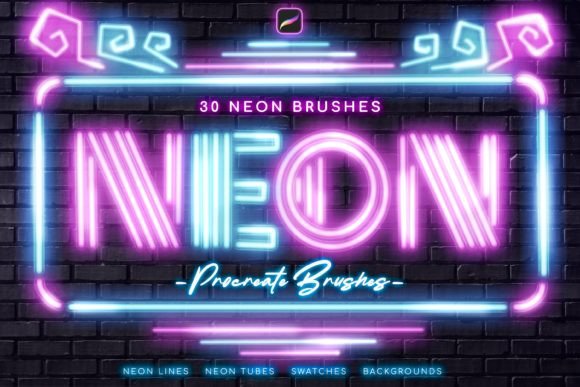
The Neon Procreate Brushes kit is designed to address these specific pain points by providing a comprehensive set of tools tailored for light simulation. Instead of building effects from scratch, users gain immediate access to thirty specialized brushes that replicate the physical properties of neon tubing. This includes realistic neon lines, tubes, dots, and special glowing brushes that automatically handle the diffusion and intensity of light. By integrating these tools into your workflow, you shift the focus from technical troubleshooting to creative expression.
One of the standout features of this kit is the variety of tube sizes and line styles. With twenty-five different neon lines and four distinct tube sizes, artists can create depth and perspective in their designs. Thicker tubes can represent foreground elements, while thinner lines recede into the background, adding dimensional realism. Additionally, the inclusion of five pen-pressure-sensitive neon brushes allows for dynamic control. As you press harder with the Apple Pencil, the line weight and intensity can adjust, mimicking the way a hand-bent glass tube might vary in thickness or brightness. This level of responsiveness ensures that every stroke feels organic and intentional.
Practical Applications and Creative Outcomes
The versatility of Neon Procreate Brushes extends across various genres of digital art. For graphic designers, these brushes are invaluable for creating mockups of storefront signage, logo designs, or promotional materials that require a retro-futuristic vibe. The ability to quickly generate cool neon signs means that concept iterations can be produced rapidly, allowing for faster client feedback and refinement. The kit also includes special color swatches featuring fourteen curated neon colors. These pre-selected hues are optimized to work with the brushes, ensuring that the glow effect looks authentic without requiring manual color correction.
Illustrators working on cyberpunk or sci-fi themes will find the dot brushes and glowing effects particularly useful. The four dot brushes can simulate individual LED lights or the fragmented glow of damaged signage, adding narrative details to a scene. The special brush for glowing enables artists to add ambient light spills onto surrounding surfaces, such as wet pavement or brick walls. Speaking of which, the kit includes a brick wall background, providing an immediate context for testing and showcasing your neon creations. This texture serves as a perfect canvas to demonstrate how light bounces off rough surfaces, enhancing the overall realism of the composition.
Implementation and Workflow Integration
Integrating these tools into your existing Procreate workflow is straightforward. It is important to note that these brushes are compatible ONLY with the Procreate application for Apple iPad. They will not function with Adobe Photoshop, Clip Studio Paint, or other graphic editing software. This specialization ensures that the brushes leverage Procreate’s specific engine capabilities for maximum performance and visual fidelity.
To get started, simply download the file directly onto your iPad. Locate the Neon_ by_Sko4 .brushset file and tap on it. Procreate will automatically install all thirty brushes, which will then appear at the top of your brush list. This seamless installation process eliminates the need for complex file management or manual importing steps. Once installed, you can begin experimenting immediately. Start by selecting one of the fourteen neon colors from the included .swatches file. Choose a tube size that fits your composition, and begin drawing your design. Use the pressure-sensitive brushes for organic curves and the static line brushes for geometric precision.
Tailoring the Approach to Your Needs
Different users will approach Neon Procreate Brushes in varied ways depending on their skill level and project goals. Beginners may appreciate the preset nature of the brushes, which removes the guesswork from lighting effects. By using the provided swatches and backgrounds, new artists can learn how light behaves in a controlled environment before attempting to create custom lighting scenarios. The immediate visual feedback helps build an intuitive understanding of contrast and saturation.
Advanced users, on the other hand, may use these brushes as a base layer to be further customized. They might combine the neon tubes with additional blending modes, such as Add or Screen, to intensify the glow or integrate them into complex composites. The special glowing brush can be used sparingly to highlight key focal points, guiding the viewer’s eye through the artwork. Professionals might also utilize the dot brushes to create intricate patterns or textures that complement the main neon structures, adding a layer of sophistication to commercial projects.
Maximizing Value and Quality
To get the most out of this kit, consider the interplay between your neon elements and the background. While the included brick wall is excellent for testing, try importing your own textures to see how the neon light interacts with different materials. Glass, metal, and water all reflect light differently, and using the Neon Procreate Brushes in diverse contexts can expand your artistic range. Additionally, experiment with layering multiple brushes. For instance, use a thin neon line for the core of the tube and overlay a slightly larger, softer brush to enhance the outer halo. This technique can add extra depth and realism to your signs.
Remember that the effectiveness of neon art relies heavily on contrast. Ensure your background is sufficiently dark to allow the colors to pop. The fourteen neon colors provided are chosen for their high visibility against dark tones, but you can always adjust the brightness and saturation within Procreate to suit specific mood requirements. By mastering these tools, you can consistently produce high-impact visuals that capture the energetic essence of neon culture.
In conclusion, the Neon Procreate Brushes kit offers a practical, efficient, and high-quality solution for artists looking to incorporate realistic lighting effects into their digital work. By addressing the technical challenges of glow simulation and providing a user-friendly installation process, this resource empowers creators to focus on their artistic vision. Whether you are designing a simple sign or a complex urban nightscape, these brushes provide the necessary tools to bring your ideas to life with vibrant, authentic brilliance.