Mastering Realistic Textures with the Procreate Curly Wavy Hair Brushes Set
Digital illustration has evolved rapidly, yet one of the most persistent challenges for artists remains the depiction of organic textures. Among these, hair is notoriously difficult to render convincingly. It requires a delicate balance of flow, volume, and individual strand definition. For iPad artists using Procreate, the Procreate Curly Wavy Hair Brushes Set offers a specialized solution to this common hurdle. This collection is not merely a set of stamps; it is a toolkit designed to streamline the workflow of character designers, portrait artists, and illustrators who need to achieve high-fidelity results without spending hours on manual detailing.
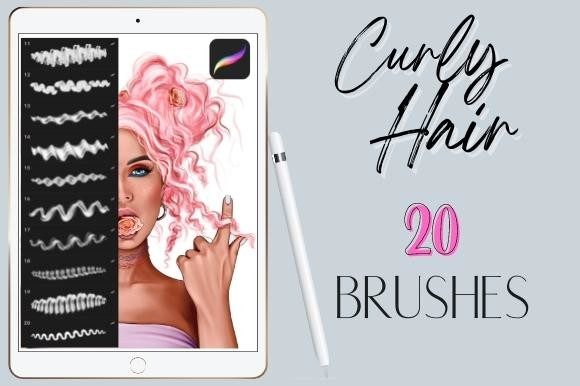
The core value of this toolset lies in its specificity. While general-purpose brushes can create lines, they often lack the nuanced tapering and irregularity found in natural hair. The Procreate Curly Wavy Hair Brushes Set addresses this by providing twenty distinct, hand-drawn brushes that mimic the chaotic yet structured nature of wavy and curly locks. By integrating these tools into your digital arsenal, you shift the focus from tedious construction to artistic expression, allowing for faster completion times and more dynamic character designs.
Understanding the Digital Hair Challenge
Creating realistic hair digitally involves more than just drawing lines. Artists must consider light reflection, gravity, clumping, and the unique growth patterns of different hair types. Straight hair can often be managed with standard tapered brushes, but curly and wavy hair introduces complex geometries. Each curl has an S-shape or spiral structure that changes perspective as it moves around the head. Manually painting each strand with a standard round brush is time-consuming and often results in a stiff, unnatural appearance.
Many illustrators struggle with the "helmet hair" effect, where hair looks like a solid mass rather than individual strands. Others find that their curls look too uniform, resembling springs rather than organic matter. These issues stem from the limitations of generic brushes that do not account for the varying thickness and opacity required to simulate depth. The Procreate Curly Wavy Hair Brushes Set is engineered to overcome these specific pain points. By offering pre-configured textures that replicate the visual noise and flow of real hair, these brushes allow artists to build volume and texture simultaneously.
What Is Included in the 20 Curly Wavy Hair Brushpack Set?
When you acquire the 20 Curly Wavy Hair Brushpack Set for Procreate, you are gaining access to a diverse range of tools tailored for different stages of the hair-rendering process. The set includes twenty various hand-drawn realistic wavy hair brushes, each designed to serve a specific function. Some brushes are optimized for laying down the base shape and volume, while others are finer, intended for adding stray hairs, flyaways, and detailed highlights.
It is crucial to note that these are digital brushes that will only work in the Procreate App for iPad. They will not work in other applications such as Photoshop, Clip Studio Paint, or Procreate Pocket on iPhone. This exclusivity ensures that the brushes are optimized for the Apple Pencil’s pressure sensitivity and tilt features, providing a responsive and natural drawing experience. The hand-drawn nature of the brush tips means that no two strokes are exactly alike, preventing the repetitive patterns that often plague digital art.
Practical Applications and Workflow Integration
Integrating the Procreate Curly Wavy Hair Brushes Set into your workflow can significantly enhance efficiency. Here is how different users might approach using these tools to achieve professional results:
- Character Concept Artists: For those working in game design or animation, speed is essential. These brushes allow for rapid iteration of hairstyles. You can block in the general shape of the hair using the broader brushes in the set, then quickly refine the edges with the finer tools. This enables the exploration of multiple design options in a fraction of the time it would take with standard brushes.
- Portrait Illustrators: Artists focusing on realism can use the set to add subtle texture to their subjects. By layering different brushes from the pack, you can create the illusion of depth. Start with a mid-tone base, add darker shadows to define the curls, and finish with lighter strokes for highlights. The variation in the twenty brushes ensures that the hair does not look flat or one-dimensional.
- Fantasy and Sci-Fi Creators: Even when designing non-human characters, the principles of hair physics apply. Whether you are illustrating an elf with flowing locks or a creature with fur-like tendrils, the organic flow provided by the Procreate Curly Wavy Hair Brushes Set can be adapted to suit fantastical elements. The wavy textures provide a natural foundation that can be colored and modified to fit any palette.
Techniques for Maximizing Realism
To get the most out of the 20 Curly Wavy Hair Brushpack Set for Procreate, it is helpful to understand a few key techniques. First, vary your pressure. The brushes are designed to respond to the Apple Pencil, so pressing harder will create thicker, more opaque strokes, while a lighter touch will produce fine, translucent hairs. This dynamic range is essential for creating the soft edges seen in natural hair.
Second, utilize layering. Do not attempt to create the entire hairstyle on a single layer. Start with a base layer for the overall shape and color. Add a new layer for shadows and deeper curls, using a darker shade. Finally, add highlights and stray hairs on a top layer. This method allows for non-destructive editing, meaning you can adjust the intensity of the shadows or highlights without affecting the base structure.
Third, rotate your canvas. Hair flows in specific directions based on the head's structure. Rotating your canvas allows you to draw each curl in the most comfortable direction, ensuring smooth, confident strokes. The Procreate Curly Wavy Hair Brushes Set responds well to this technique, maintaining the integrity of the brush shape regardless of orientation.
Considerations for Different Skill Levels
Beginners may find the Procreate Curly Wavy Hair Brushes Set particularly forgiving. Because the brushes already contain the texture of hair, there is less pressure to perfect every individual strand. This allows new artists to focus on composition and color theory without getting bogged down in technical details. However, it is important to study reference images to understand how light interacts with curly hair, as the brushes are tools, not magic solutions.
Advanced artists will appreciate the time-saving aspect of the set. While experienced illustrators can certainly paint hair from scratch, doing so for every project is inefficient. These brushes serve as a high-quality starting point that can be customized further. Advanced users might combine these brushes with custom blending modes or additional texture overlays to create unique stylistic effects. The versatility of the twenty different brushes allows for extensive experimentation.
Final Thoughts on Enhancing Your Digital Art
The Procreate Curly Wavy Hair Brushes Set represents a practical investment for any serious iPad illustrator. By addressing the specific challenges of rendering curly and wavy textures, it empowers artists to produce higher quality work with greater efficiency. Whether you are looking to improve your portrait skills, speed up your concept art workflow, or simply explore new creative possibilities, this brush pack provides the necessary tools to elevate your digital paintings.
Remember that the key to mastery lies in practice and understanding the underlying structure of hair. Use the 20 Curly Wavy Hair Brushpack Set for Procreate as a foundation, but continue to observe real-life references and experiment with layering and lighting. With these resources at your disposal, you can transform one of the most daunting aspects of digital illustration into a standout feature of your artwork.