Master Digital Inking with 40 Pro Brushes
Digital art has come a long way, yet many creators still crave the tactile, unpredictable charm of traditional media. There is a distinct satisfaction in the scratch of a nib on paper or the wet spread of ink on textured stock. Replicating this organic feel on a screen can be challenging, often resulting in work that looks too clean, sterile, or obviously computer-generated. This is where specialized tools become essential. The INK. 40 Photoshop Brushes Action set bridges the gap between digital precision and analog soul, offering a comprehensive toolkit for artists who want their digital illustrations to breathe with the same life as hand-drawn originals.
Why Traditional Texture Matters in Digital Work
For beginners and seasoned professionals alike, the "perfect" line can sometimes be the enemy of good art. Real ink behaves unpredictably. It splatters, it bleeds, and it varies in opacity depending on pressure and speed. When you rely solely on standard digital brushes, you miss out on these happy accidents that give artwork character. The primary appeal of the INK. 40 Photoshop Brushes for Inking Photoshop Action lies in its ability to reintroduce that natural randomness.
This collection was not assembled randomly. It is the result of two years of intensive work on illustrative series for the dilogy book Anisotropic Highway and numerous inner spread illustrations for Analog SF-magazine. During this period, the goal was clear: to achieve the authentic effect of drawing and writing with instruments filled with real ink. The resulting brush set captures the nuances of sharp nib pens, flat pens, bristle brushes, and ruling pens. By using these tools, you are not just drawing lines; you are simulating a physical process.
A Closer Look at the Brush Collection
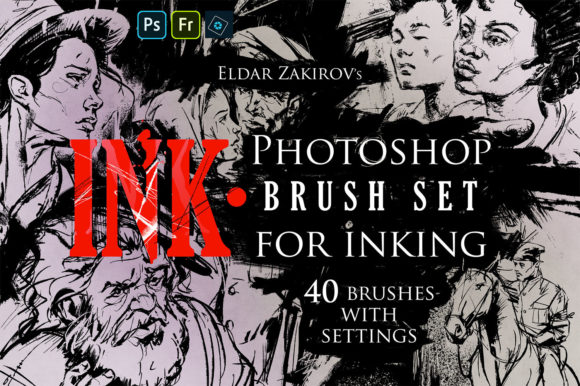
The set includes 40 Photoshop Brushes with all settings for inking, carefully curated to cover a wide range of artistic needs. At its core are 37 brushes imitating real pens, brushes, sprays, and splashes. These are not simple stamps; they are dynamic tools that respond to your tablet’s pressure sensitivity, mimicking how real instruments behave when loaded with ink.
- Pens and Nibs: Includes sharp nib and flat pen simulations that offer crisp, variable-width lines perfect for comic inking, typography, and detailed contour work.
- Brushes: Features round and flat brushes loaded by ink, as well as bristle brushes. These provide a softer, more painterly approach, ideal for shading and filling larger areas with texture.
- Specialty Tools: Imitates ruling pens and folded pens, allowing for unique line weights and architectural-style precision that stands out from standard vector lines.
What truly sets this pack apart is the attention to detail regarding imperfections. Some of these brushes naturally create nice spatter, just as real instruments do when flicked or moved quickly. To enhance this further, the set includes 3 splashes blot brushes from the “SPLASHES” brush set. These are designed specifically for realistic digital inking in Photoshop, allowing you to add accidental drips, ink blots, and spray effects that give liveness and fine naturalness to your art.
The Power of the DEHALFTONIZER Action
Beyond the brushes themselves, the package includes a powerful macro action known as the ‘DEHALFTONIZER’. This tool is a game-changer for artists looking to incorporate vintage printing aesthetics into their modern workflow. Halftone patterns—those classic dots used in newspapers and comic books to create shades of grey—are difficult to replicate manually without looking artificial.
The DEHALFTONIZER macro action for Photoshop handles the delicate task of turning grey areas into dotted halftones automatically. This allows you to add depth, shadow, and a retro comic book feel to your illustrations with a single click. It saves hours of manual stippling or pattern overlay adjustments, ensuring that your shading integrates seamlessly with the inked lines created by the brush set.
Practical Applications for Creators
Who benefits most from this toolkit? The answer is surprisingly broad. Because the INK. 40 Photoshop Brushes Action is compatible with Adobe Photoshop, Photoshop Elements, and Adobe Fresco, it is accessible to a wide range of users, from hobbyists to professional graphic designers.
Illustrators and Comic Artists
For comic creators, consistent yet organic line work is crucial. The ruling pen and nib brushes allow for precise panel borders and expressive character outlines. The splash brushes can be used to depict motion, impact, or atmospheric effects like rain or blood, adding drama to sequential art.
Graphic Designers and Branding Experts
In marketing and branding, authenticity sells. A logo or promotional graphic that looks hand-lettered or hand-drawn can convey warmth and craftsmanship. Using the flat pen or bristle brushes, designers can create custom typography and textures that feel human-made, helping brands stand out in a sea of generic digital assets.
Educators and Hobbyists
For those learning digital art, this set serves as an excellent educational tool. It helps beginners understand how pressure and angle affect line quality. Instead of fighting with software to make a line look "real," students can focus on gesture and form, letting the brushes handle the textural heavy lifting.
Getting the Most Out of Your Digital Ink
To truly leverage the potential of this brush set, consider a few practical observations. First, remember that these brushes imitate physical instruments. Like real ink, they perform best when you vary your speed and pressure. Hovering too slowly might cause excessive ink buildup (or digital equivalent), while fast strokes will create the desired spatter and tapering.
Second, combine the brushes with the DEHALFTONIZER action strategically. Use the solid ink brushes for your primary subjects and the halftone effect for backgrounds or shadows. This contrast creates visual hierarchy and depth. Finally, don’t be afraid to layer. Use a splatter brush over a dry ink line to suggest age or movement. The goal is to break the perfection of the digital canvas.
Whether you are working on a sci-fi magazine spread, a children’s book, or a social media campaign, the INK. 40 Photoshop Brushes Action provides the necessary tools to infuse your work with the irregular beauty of traditional ink. It transforms the sterile digital environment into a vibrant studio space where every stroke feels intentional, alive, and authentically human.