Streamlining Digital Lettering with Outline Procreate Brushes
Digital lettering and illustration on the iPad have evolved from niche hobbies into essential tools for modern creatives. For professionals ranging from graphic designers to social media marketers, the ability to produce polished, eye-catching typography quickly is a significant asset. However, achieving consistent, multi-layered effects—such as colored outlines with distinct fills—can often require tedious manual work in standard digital workflows. This is where specialized toolsets like Outline Procreate Brushes come into play, offering a streamlined approach to creating complex visual styles with minimal effort.
This collection is designed specifically for users of the Procreate application on Apple iPad. It addresses a common pain point in digital design: the time consumed by layering and masking to achieve simple two-tone or gradient effects. By integrating these functions directly into the brush engine, the set allows artists to generate professional-grade lettering and illustrations in a single stroke. Understanding the mechanics, versatility, and practical applications of these brushes can help creators determine if they are a suitable addition to their digital toolkit.
The Mechanics of Efficiency: How the Brushes Work
The core value proposition of Outline Procreate Brushes lies in its ability to combine multiple visual attributes into one action. Traditionally, creating text or shapes with a colored outline and a different interior fill requires at least two steps: drawing the base shape and then adding a stroke effect via layer styles or manual tracing. This process not only slows down workflow but can also result in inconsistencies, especially when working freehand.
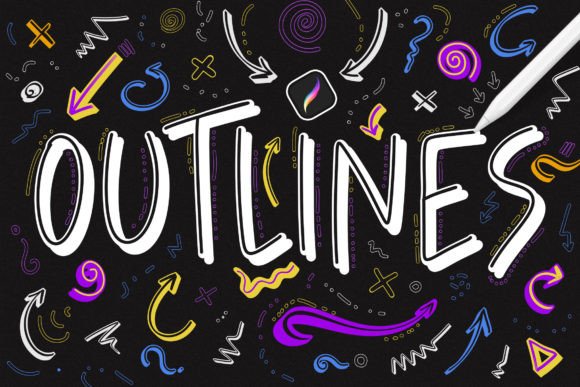
With this brush set, the software handles the complexity internally. When you draw a line, the brush simultaneously renders the outline and the fill based on pre-configured settings. This "one-move" capability is particularly beneficial for lettering artists who need to maintain fluidity and rhythm in their strokes. The result is a clean, uniform look that retains the organic feel of hand-drawn art while possessing the precision of vector-like graphics.
Breakdown of the 124-Brush Collection
The collection comprises 124 distinct brushes, categorized into three primary functional groups. This variety ensures that users are not limited to a single aesthetic but can experiment with different styles depending on the project requirements.
- 34 Classic Outline Brushes: These feature a solid color outline with an empty or transparent fill. They are ideal for creating stencil effects, layered compositions, or situations where the background texture needs to show through the lettering.
- 34 Gradient Outline Brushes: Similar to the classic set, these have an empty fill, but the outline itself features a gradient. This adds depth and visual interest to borders and frames without requiring additional editing.
- 34 Two-Color Brushes: Perhaps the most versatile category, these brushes apply one color to the outline and a second, distinct color to the fill. This is the go-to option for bold, pop-art style lettering and high-contrast illustrations.
In addition to these primary categories, the remaining brushes in the set offer variations in texture, weight, and pressure sensitivity, providing a comprehensive library for diverse artistic needs. The inclusion of pen pressure sensitivity across the set means that line weight can vary naturally with the user’s touch, preserving the expressive quality of traditional ink work.
Practical Applications for Professionals and Creators
While hobbyists may appreciate the ease of use, the true strength of Outline Procreate Brushes is evident in professional workflows. Time is a critical resource for freelancers, agency designers, and content creators. Tools that reduce repetitive tasks directly impact productivity and profitability.
Social Media and Marketing Content
Marketers and bloggers frequently need to create engaging visuals for platforms like Instagram, Pinterest, and TikTok. Text overlays are a staple of these formats. Using these brushes, a creator can draft compelling quotes or headlines rapidly. The ability to switch between gradient outlines and two-color fills allows for brand consistency while keeping the visual content fresh and dynamic. For small business owners managing their own social presence, this reduces the reliance on complex desktop software like Adobe Illustrator for quick turnarounds.
Educational Materials and Publishing
Educators and publishers often require clear, legible, and visually appealing headers for worksheets, e-books, and presentations. The classic outline brushes with empty fills are particularly useful here, as they allow text to sit cleanly over images or colored backgrounds without obscuring underlying information. The consistency of the brush strokes ensures that educational materials look polished and professional, enhancing credibility and reader engagement.
Concept Art and Illustration
For illustrators, these brushes serve as an excellent starting point for character designs or comic book lettering. The double-color brushes can define forms quickly, allowing artists to focus on composition and narrative rather than technical rendering. While final production art might require more refined vector tools, the speed of these brushes makes them invaluable for brainstorming, sketching, and creating stylized assets.
Usability and Installation Process
One of the most appealing aspects of digital brush sets is the ease of integration. Outline Procreate Brushes are distributed in the .brushset format, which is native to Procreate. The installation process is straightforward and does not require technical expertise.
- Download the file directly to your iPad.
- Tap on the
.brushsetfile. - Procreate will automatically launch and install the brushes.
- The new brushes appear at the top of your brush library, ready for immediate use.
This seamless installation removes barriers to entry, allowing users to start experimenting within minutes. However, it is crucial to note a significant limitation: these brushes are compatible only with the Procreate application on Apple iPad. They will not function in Adobe Photoshop, Clip Studio Paint, or any other graphic editing software. Users invested in the Adobe ecosystem or those using Android tablets will need to seek alternative solutions. This exclusivity is a trade-off; while it limits the audience, it ensures optimal performance and stability within the Procreate environment.
Evaluating Quality and Long-Term Value
When assessing the value of any digital asset, consistency and reliability are paramount. Outline Procreate Brushes demonstrate a high level of technical proficiency. The edges are clean, the gradients are smooth, and the pressure response feels natural. There is no noticeable lag or jitter, which is often a concern with complex custom brushes.
The long-term value of this set depends on the user’s specific needs. For those who frequently create lettering-based art, logos, or decorative elements, the time saved per project accumulates significantly. The variety of 124 brushes ensures that the set remains relevant across different projects and trends. However, for artists who primarily work with photorealistic painting or intricate vector graphics, the utility may be more limited. It is a specialized tool rather than a general-purpose solution.
Furthermore, the learning curve is minimal. Because the brushes automate complex effects, users do not need advanced knowledge of layer blending modes or mask techniques to achieve professional results. This democratizes high-quality design, making it accessible to beginners while still offering efficiency gains for experts.
Final Considerations for Potential Users
Before purchasing or downloading Outline Procreate Brushes, consider your current workflow and device ecosystem. If you are an iPad user committed to Procreate, this set offers a robust solution for enhancing your lettering and illustration capabilities. It is particularly recommended for:
- Freelance designers looking to speed up client deliverables.
- Social media managers creating daily content.
- Educators designing engaging visual aids.
- Hobbyists wanting to elevate the polish of their digital art.
Conversely, if you rely on cross-platform software or prefer manual control over every aspect of your stroke rendering, this automated approach may feel restrictive. Ultimately, the effectiveness of these brushes lies in their ability to simplify the creative process without sacrificing aesthetic quality. By reducing technical friction, they allow artists to focus more on creativity and less on execution, making them a worthwhile investment for the right user.