Mastering Depth and Dimension with Shading Procreate Brushes
Digital lettering and illustration on the iPad have revolutionized how artists approach typography and design. However, achieving professional-grade depth, shadow, and dimension often requires a steep learning curve or hours of meticulous manual blending. This is where Shading Procreate Brushes become an indispensable tool in your digital arsenal. By streamlining the complex process of adding volume to flat shapes, these specialized brushes allow creators to focus more on creativity and less on technical friction. Whether you are a seasoned graphic designer or a hobbyist looking to elevate your hand-lettering game, understanding how to leverage these tools can significantly transform your workflow.
The Challenge of Digital Shading
One of the most common hurdles for digital artists is replicating the natural interplay of light and shadow that occurs in traditional media. In physical drawing, shading is often achieved through pressure control, layering pencils, or blending stumps. In the digital realm, this process can feel disjointed. Artists often find themselves switching between multiple layers, adjusting opacity sliders, and selecting different brush engines just to create a simple drop shadow or a gradient fill. This fragmentation breaks the creative flow and can lead to inconsistent results.
Furthermore, creating dual-tone effects—such as an outlined letter with a contrasting filled interior—typically requires multiple steps. You might draw the outline on one layer, create a new layer beneath it for the fill, and then carefully mask or erase areas to ensure clean edges. This multi-step process is not only time-consuming but also prone to errors, especially when working on intricate letterforms or fast-paced projects. The need for efficiency without sacrificing quality is a primary driver for adopting specialized tools like Shading Procreate Brushes.
How Specialized Brushes Simplify the Workflow
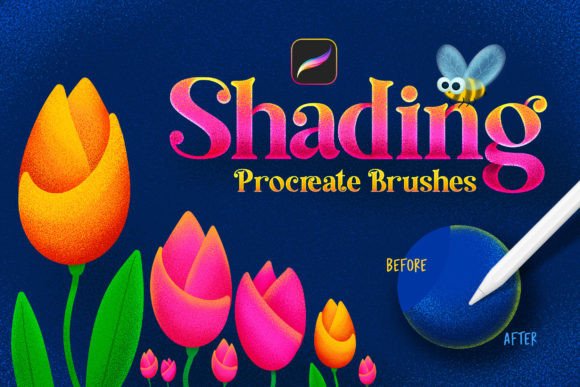
The core advantage of using a dedicated brush set designed for shading and lettering is the consolidation of actions. Instead of juggling multiple layers and tools, these brushes integrate complex behaviors into a single stroke. For instance, the ability to get two colored lines in just one move is a game-changer for lettering artists. With these brushes, the main color is automatically applied to the outline, while a second, distinct color fills the interior. This simultaneous application ensures perfect alignment between the stroke and the fill, eliminating the guesswork and manual adjustment previously required.
This efficiency is particularly beneficial for artists who produce high volumes of work, such as social media content creators, logo designers, or educators creating digital worksheets. By reducing the number of taps and swipes needed to achieve a polished look, you can produce more content in less time. Moreover, the consistency provided by preset brush behaviors ensures that your style remains uniform across different pieces, which is crucial for building a recognizable brand identity.
Exploring the Versatility of the Brush Set
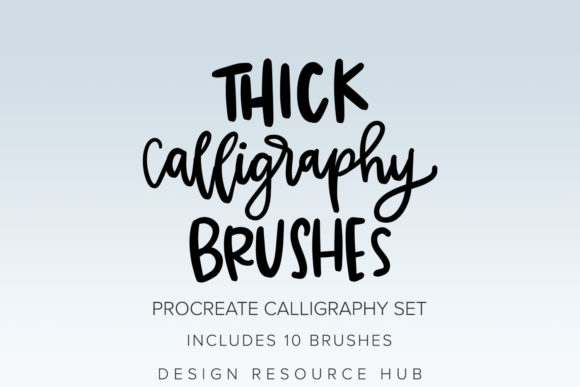
A comprehensive collection, such as the one featuring 124 brushes in total, offers a wide range of stylistic options to suit various artistic needs. These sets typically include classic outlines with empty fills, allowing for traditional coloring techniques, as well as gradient outlines that add a modern, dynamic flair to your typography. The inclusion of double-color brushes is particularly notable for their ability to create immediate visual contrast and depth.
With 25 primary Procreate brushes focused on pen pressure sensitivity, the user experience feels organic and responsive. Pressure sensitivity is critical for natural-looking shading; it allows the brush to vary in thickness and opacity based on how hard you press with the Apple Pencil. This feature mimics the behavior of real-world markers and pens, making the transition from traditional to digital media smoother for newcomers. Easy-to-make shades mean that even users with limited technical knowledge can achieve sophisticated lighting effects by simply varying their stroke pressure and speed.
Practical Applications for Different Users
Different artists will approach Shading Procreate Brushes in unique ways, depending on their specific goals. For hand-lettering enthusiasts, the primary benefit lies in the speed of creating bold, impactful quotes. The double-color functionality allows for instant creation of pop-art styles or retro-inspired typography without the hassle of manual coloring. You can experiment with complementary colors for the outline and fill to create vibrancy, or use analogous colors for a more subtle, harmonious look.
Illustrators and character designers may find the gradient outline brushes useful for adding depth to comic book panels or storybook illustrations. These brushes can quickly define the edges of characters against busy backgrounds, ensuring readability and visual separation. Additionally, the classic outline brushes with empty fills provide a solid foundation for those who prefer to color digitally using separate layers, offering flexibility for detailed rendering later in the process.
Educators and tutorial creators also benefit significantly from these tools. When demonstrating lettering techniques on screen, the immediacy of the brush response helps maintain viewer engagement. The ease of drawing means that instructors can focus on explaining compositional principles rather than getting bogged down in technical setup during live demonstrations.
Implementation and Compatibility Considerations
To get the most out of these tools, it is essential to understand their technical requirements. These brushes are compatible ONLY with the Procreate application for Apple iPad. They will not work with Adobe Photoshop, Clip Studio Paint, or any other graphic editing software. This exclusivity ensures that the brushes are optimized for Procreate’s specific engine, taking full advantage of its gesture controls and layer management systems. Before purchasing or downloading, ensure you have an iPad capable of running the latest version of Procreate to avoid compatibility issues.
Installation is straightforward but requires attention to detail. To begin, download the files directly onto your iPad. Locate the .brushset files in your Files app or Downloads folder. Clicking on these files will trigger Procreate to automatically install the entire set. Once installed, the brushes will appear at the top of your brush list, ready for immediate use. It is recommended to organize these new brushes into a dedicated group within Procreate to keep your workspace tidy and accessible.
Tips for Maximizing Your Results
While the brushes are designed to be easy to use, experimenting with settings can yield even better results. Try adjusting the streamlines feature in Procreate to smooth out your strokes further, which is particularly helpful for long, sweeping curves in calligraphy. Additionally, play with the blend modes of the layers you are working on. Placing a shaded layer over a textured background can create interesting interactions that enhance the overall aesthetic of your piece.
Color theory plays a significant role in effective shading. When using the double-color brushes, consider the emotional impact of your color choices. High-contrast combinations grab attention, while low-contrast pairings evoke calmness. Use the gradient brushes to simulate light sources, keeping consistency in mind across your entire composition. If your light source is coming from the top left, ensure your gradients and shadows reflect that direction to maintain realism.
Ultimately, Shading Procreate Brushes are more than just a convenience; they are a catalyst for creative exploration. By removing the technical barriers associated with digital shading and lettering, they empower artists to execute their visions with greater confidence and speed. Whether you are looking to refine your professional portfolio or simply enjoy the process of digital art more fully, integrating these tools into your workflow offers a practical path to improvement. Embrace the simplicity, experiment with the variations, and let your creativity flow without interruption.