Mastering Digital Texture: A Deep Dive into Realistic FUR Brushes for Affinity Photo
In the evolving landscape of digital illustration, the demand for specialized tools that bridge the gap between traditional media and digital precision has never been higher. For artists working within the Serif ecosystem, the introduction of Realistic FUR Brushes for Affinity Photo represents a significant leap forward in textural rendering. This comprehensive suite is not merely a collection of standard stamps; it is a meticulously crafted toolkit designed to address one of the most challenging aspects of character design and creature concept art: the simulation of organic, volumetric hair and fur.
The complexity of painting fur lies in its dual nature. It must appear soft and tangible while adhering to the underlying anatomical structure of the subject. Whether an artist is illustrating a hyper-realistic wolf, a stylized anthropomorphic character, or a fantasy creature with unique wooly textures, the brush engine must respond intuitively to pressure, tilt, and direction. The 28 Realistic FUR Brushes for Affinity Photo Designer set meets this challenge by offering a versatile array of tools that cater to both broad coverage and intricate detailing, ensuring that creators can achieve professional-grade results without leaving their preferred software environment.
The Architecture of the Brush Set
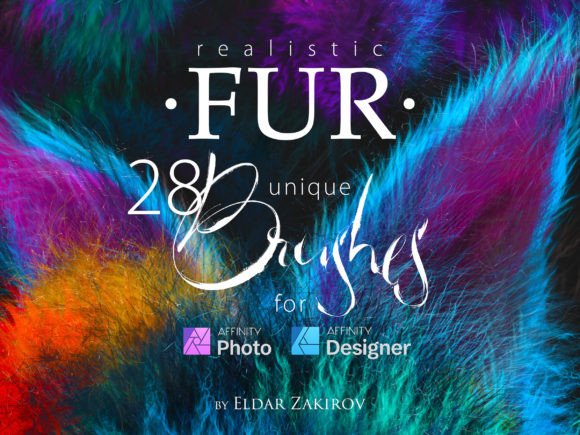
Understanding the composition of this brush pack is essential for maximizing its utility. The set comprises a total of 28 distinct brushes, but its value extends beyond the raw number. The collection is strategically divided into two primary categories: remastered classics and entirely new creations. Specifically, 20 brushes have been remastered from previous successful FUR brush sets originally designed for Photoshop and Clip Studio Paint. This migration process involved optimizing the brush dynamics to align perfectly with Affinity’s proprietary engine, ensuring that the behavior feels native and responsive rather than like a ported asset.
Complementing these established tools are 8 new brushes developed exclusively for this release. These additions expand the creative palette, offering novel textures and stroke behaviors that were not present in earlier iterations. Furthermore, the set demonstrates a keen attention to anatomical accuracy through its handling of directional flow. Brushes depicting fur from a side view—specifically identified as brushes 2, 3, and 8—include dual options for hair growth direction. Each of these three brushes offers variants for both left and right hair growth. Consequently, while the base count suggests three tools, the inclusion of directional variants effectively adds three more unique functionalities to the workflow. This thoughtful design eliminates the need for artists to manually flip canvases or adjust brush settings mid-stroke, streamlining the painting process significantly.
Applications Across Creative Disciplines
The versatility of the Realistic FUR Brushes for Affinity Photo makes them applicable across a wide spectrum of artistic disciplines. While the primary marketing focus is on animals and "furries" (anthropomorphic characters), the utility of these tools extends far beyond niche genres. Professional concept artists, hobbyists, and educational institutions can leverage these brushes for various real-world applications.
Character Design and Anthropomorphic Art
For creators specializing in original characters (OCs) with fur, the ability to render believable texture is paramount. The brush set allows for the differentiation between various coat types, from the sleek, short hair of a domestic cat to the thick, matted wool of a highland cow. Artists can layer these brushes to build depth, starting with broader strokes to establish the form and volume, then transitioning to finer tips for stray hairs and highlight details. This layering capability is crucial for avoiding the "plastic" look that often plagues digital paintings, adding a sense of life and movement to static images.
Wildlife Illustration and Natural History Art
Educators and researchers who require accurate visual representations of fauna will find these tools invaluable. The remastered brushes provide a level of realism that supports scientific illustration, where accuracy in texture can be as important as anatomical correctness. By using the side-view brushes with their specific left and right growth directions, illustrators can accurately depict how light interacts with the curvature of an animal’s body, enhancing the three-dimensional quality of the final piece.
Fantasy and Creature Concepting
In the realm of fantasy art, creatures often possess exaggerated or non-existent biological references. The 28 Realistic FUR Brushes for Affinity Photo Designer set provides a foundational texture library that can be manipulated to create imaginary beasts. Whether designing a dragon with downy underfur or a mythical beast with spiky, quill-like hair, the dynamic range of the brushes allows for experimentation. The minimal versions tested ensure compatibility and stability, allowing artists to focus on creativity rather than troubleshooting technical glitches.
Technical Compatibility and Workflow Integration
A critical consideration for any digital asset is its compatibility with existing software versions. The developers of this brush set have prioritized accessibility by ensuring functionality across older, stable releases of the Affinity suite. The brushes have been tested and verified on Affinity Photo v. 1.8.2 and Affinity Designer v. 1.7.0. This backward compatibility is a significant advantage for professionals who may not have upgraded to the latest V2 suite immediately or who maintain legacy workflows for client consistency.
Integration into the daily workflow is seamless. Upon installation, the brushes appear within the standard brush panel, ready for immediate use. There is no need for complex scripting or external plugins. The brushes respond to the standard pressure sensitivity of graphics tablets, allowing for natural variation in stroke width and opacity. This responsiveness is key to achieving organic results, as it mimics the physical resistance and flow of traditional bristle brushes.
Advantages Over Generic Brush Libraries
While generic round or square brushes can be manipulated to simulate hair, they often lack the nuanced texture required for high-quality fur rendering. The Realistic FUR Brushes for Affinity Photo offer several distinct advantages:
- Anatomical Awareness: The inclusion of directional variants for side-view brushes acknowledges the way fur grows in patterns around muscle structures, reducing the time spent on manual correction.
- Texture Variety: With 28 unique options, artists are not limited to a single "fur look." The set includes tools for coarse hair, fine down, clumped wet fur, and fluffy volumes.
- Optimized Performance: Remastering from Photoshop and Clip Studio formats ensures that the brushes are optimized for Affinity’s rendering engine, resulting in smoother performance and fewer artifacts during rapid strokes.
- Cross-Application Utility: The designation for both Photo and Designer means that vector-based illustrators and raster-based painters can both benefit from the set, depending on their specific project needs and export requirements.
Best Practices for Utilizing Fur Brushes
To extract the maximum potential from this toolset, artists should adopt a layered approach to painting. Begin by establishing the underlying form of the creature using solid colors and basic shading. Once the anatomy is defined, select a broader fur brush from the set to block in the general direction of hair growth. It is crucial to follow the flow of the muscles beneath the skin; fur does not grow randomly but follows specific patterns dictated by biology.
As the painting progresses, switch to the finer brushes within the 28 Realistic FUR Brushes for Affinity Photo Designer collection. Use these to add individual strands, particularly in areas where light hits the crest of the form. The side-view brushes with left and right options should be employed when rendering the contours of the body, ensuring that the transition from light to shadow feels natural. Avoid overusing the brushes; subtlety is often more effective than density. A few well-placed stray hairs can convey more realism than a dense wall of texture.
Furthermore, consider the color variation within the fur. Real fur is rarely a single flat color. Use the brushes in conjunction with layer blending modes such as Overlay or Soft Light to introduce tonal variations. This technique adds depth and prevents the fur from appearing flat or monochromatic. The dynamic nature of these brushes allows for quick adjustments, enabling artists to experiment with different color palettes and lighting scenarios without committing to permanent changes until the final stages.
Conclusion: Elevating Digital Textures
The Realistic FUR Brushes for Affinity Photo represent a mature, well-considered solution for digital artists struggling with textural complexity. By combining remastered reliability with new, innovative tools, this set addresses the specific needs of creature designers, wildlife illustrators, and fantasy artists. The attention to detail, particularly in the directional variants and cross-version compatibility, underscores a commitment to user experience and professional utility. For anyone looking to enhance their digital painting toolkit with robust, realistic, and versatile fur rendering capabilities, this collection offers a compelling and practical resource.