Realistic Foliage & Moss Brushes
Creating convincing natural environments in digital art is often one of the most time-consuming tasks for illustrators and designers. Painting individual leaves, blades of grass, or textured moss by hand can take hours, often resulting in repetitive patterns that look artificial. This is where specialized tools like Foliage Grass Moss Photoshop Brushes become invaluable. Designed to streamline the workflow for artists using Adobe Photoshop, Photoshop Elements, and Adobe Fresco, this collection offers a practical solution for painting realistic forests, trees, and ground cover with speed and precision.
Why Natural Textures Are Challenging to Paint
Nature is inherently chaotic. Unlike geometric shapes or man-made objects, organic elements like foliage do not follow strict rules. A forest floor is a complex mix of decaying leaves, vibrant green moss, patches of dirt, and scattered twigs. Replicating this randomness manually requires a deep understanding of light, shadow, and texture. For beginners, this learning curve can be steep. Even experienced professionals may find themselves bogged down by the sheer volume of detail required for large-scale landscapes.
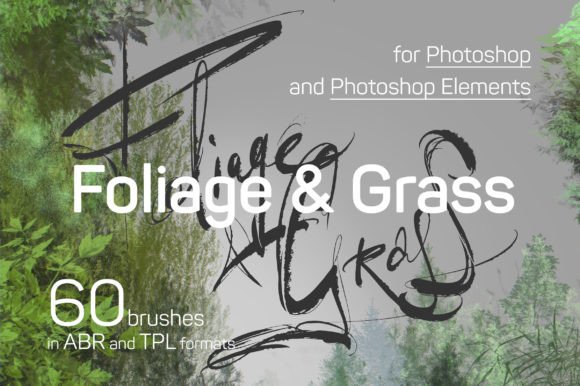
The primary appeal of the Foliage Grass 60 brushes set is that it bridges the gap between artistic intent and technical execution. Instead of painting every single leaf, you can use presets that mimic the natural clustering and variation found in real life. This allows you to focus on composition and lighting rather than getting lost in microscopic details.
What Is Included in the Package
When you acquire this toolset, you are not just getting a single brush tip; you are receiving a comprehensive library designed for versatility. The package is structured to support different workflows within the Adobe ecosystem. Here is a breakdown of what you receive:
- ABR File: The file named «Foliage Grass 2019 ©Eldar Zakirov.abr» contains all 60 product presets in the standard ABR Brushes format. Once installed, these appear directly in your Brush list, making them accessible for immediate use in painting and drawing.
- TPL File: The file «Foliage Grass 2019 ©Eldar Zakirov.tpl» includes the same 60 presets but formatted as Tool Presets. This is particularly useful if you prefer saving specific tool configurations, such as opacity, flow, and size dynamics, alongside the brush shape.
- PDF Manual: The «Foliage Grass Manual Info and FAQ.pdf» provides essential documentation. It covers installation instructions, general information, and tips to help you get the most out of the brushes. You can download or read this guide directly via the provided link to ensure you understand the best practices for each preset.
- Visual Reference: The «The Presets Strokes List.jpg» serves as a quick visual index. It displays the stroke trails for every brush, subdivided by color and category, helping you identify the right tool for the job without trial and error.
Breakdown of Brush Categories
The collection is thoughtfully organized into three main categories, each targeting a specific aspect of landscape painting. Understanding these subdivisions helps you apply the brushes more effectively.
Leafs Presets
With 16 distinct presets, the «Leafs» category focuses on tree foliage. These brushes are ideal for creating canopy layers, distant tree lines, or close-up clusters of leaves. They are designed to simulate the irregular edges and overlapping nature of broadleaf trees. When used with varying opacity and size jitter, they can create a sense of depth and volume that static images often lack.
Carpet Presets
The 15 «Carpet» presets are dedicated to on-ground foliage. This includes grass, low-lying shrubs, and mixed ground cover. These brushes are essential for grounding your subjects in an environment. Whether you are painting a meadow, a forest floor, or a garden path, these tools help establish the base layer of your scene. They work exceptionally well for adding texture to flat areas, breaking up monotony with natural variation.
Conifer Presets
For those painting evergreen environments, the 13 «Conifer» presets are indispensable. These are tailored for fir trees, pines, and other needle-bearing plants. Conifers have a distinct texture that differs significantly from broadleaf trees, requiring sharper, more clustered strokes. These brushes capture that specific aesthetic, allowing for the rapid creation of pine forests or winter landscapes.
Compatibility and Workflow Integration
One of the strongest features of Foliage Grass Moss Photoshop Brushes is their broad compatibility. They are optimized for Adobe Photoshop, Photoshop Elements, and Adobe Fresco. This means whether you are working on a desktop with a powerful workstation or on a tablet with Apple Pencil support, you can integrate these tools into your existing pipeline.
The availability of both ABR and TPL formats ensures flexibility. If you are a user who relies heavily on custom tool settings, the TPL files save you time by recalling your preferred dynamics automatically. For users who prefer a simpler approach, the ABR files drop straight into the standard brush panel, ready to paint.
Practical Use Cases for Creators
Who benefits most from this collection? The answer spans a wide range of creative professionals and hobbyists.
Digital Painters and Illustrators: If you create concept art for games or films, speed is crucial. These brushes allow you to block in environments quickly, providing a realistic base that you can refine later. They are also excellent for book illustrations where atmospheric backgrounds are needed.
Graphic Designers and Marketers: Creating promotional materials for outdoor brands, travel agencies, or eco-friendly products often requires high-quality natural imagery. Instead of relying solely on stock photos, which can look generic, you can composite unique scenes using these brushes. This adds a custom, hand-crafted feel to your designs.
Educators and Students: For those teaching digital art, this set serves as a great educational tool. It demonstrates how brush dynamics can mimic real-world textures. Students can study the stroke examples in the JPG file to understand how pressure and angle affect the final output.
Tips for Best Results
To get the most out of Foliage Grass 60 brushes, consider these practical observations:
- Layering is Key: Do not rely on a single brush stroke. Build up your foliage in layers. Start with darker, larger shapes for the background and use lighter, smaller strokes for the foreground highlights.
- Color Variation: Nature is rarely a single shade of green. Use the color picker to sample various tones from your reference images. Apply subtle shifts in hue and saturation to keep the foliage looking organic.
- Consult the Manual: The included PDF guide offers specific tips on settings. Reading the FAQ section can save you time troubleshooting common issues related to installation or performance.
- Experiment with Opacity: Lowering the opacity of your brush can create softer, more atmospheric effects, perfect for distant trees or misty mornings.
Final Thoughts
Investing in high-quality digital tools like Foliage Grass Moss Photoshop Brushes is an investment in your creative efficiency. By reducing the technical burden of painting complex natural textures, you free up mental energy for storytelling and composition. Whether you are a beginner looking to improve your landscape skills or a professional seeking to speed up your workflow, this collection provides the versatility and realism needed to bring your digital forests to life.